MAD
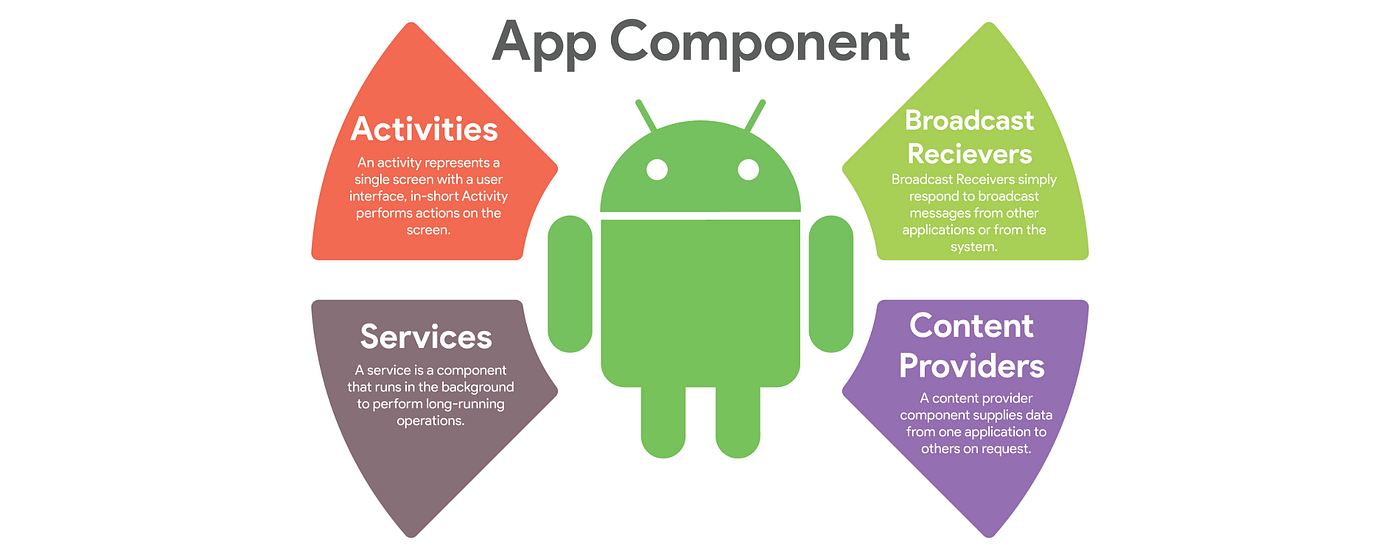
⚫Service Communication:
Service communication refers to the exchange of information between different services within an organization. In a service-oriented architecture (SOA), services interact with each other to deliver a business process or transaction. Service communication can be synchronous or asynchronous, and it can take place over different communication protocols such as HTTP, SOAP, or REST.
Why is Service Communication Important?
Effective service communication is crucial for the success of any service-oriented architecture. Here are some reasons why:
1.Enables Business Agility: Effective service communication enables organizations to respond quickly to changing business needs by enabling services to communicate with each other in real-time.
2.Improves Performance: Efficient service communication helps in improving the overall performance of the system. It reduces latency, eliminates redundancy, and optimizes the use of network resources.
3.Increases Scalability: Service communication helps in scaling the system by adding or removing services without affecting the overall performance of the system.
Best Practices for Service Communication:
1.Use a standardized communication protocol: Standardizing the communication protocol helps in simplifying the integration process and reducing the chances of errors. HTTP, SOAP, and REST are the most commonly used protocols for service communication.
2.Use Asynchronous Communication: Asynchronous communication reduces the coupling between services, enabling them to operate independently. It also enables services to handle a large number of requests without affecting the overall performance of the system.
3.Use a Message Queue: A message queue is a data structure that enables services to communicate asynchronously. It provides a buffer between services, enabling them to operate independently.
4.Use Service Contracts: A service contract defines the communication interface between services. It specifies the message format, the operations that the service supports, and the expected response.
5.Use Monitoring and Logging: Monitoring and logging help in detecting errors and identifying performance bottlenecks. It also helps in identifying the root cause of errors, enabling organizations to take corrective actions.
In conclusion, effective service communication is essential for the success of any service-oriented architecture. It enables organizations to respond quickly to changing business needs, improve performance, and increase scalability. By following the best practices outlined above, organizations can improve their service communication and achieve their business goals.
⚫Broadcast Receivers
Best Practices for Broadcast Receivers:
1.Register and unregister the Receiver Dynamically:
Broadcast Receivers can be registered either statically in the Android manifest or dynamically in code. For dynamically registered Broadcast Receivers, it is essential to unregister them when they are no longer needed to avoid memory leaks.
2.Keep Processing to a Minimum:
Broadcast Receivers should perform their tasks as quickly as possible, preferably in the background, to avoid blocking the UI thread. Long-running tasks should be performed in a separate thread or using an IntentService.
3.Use Intent Filters:
Intent Filters enable Broadcast Receivers to receive only the specific broadcasts they are interested in. This improves performance and reduces battery consumption by preventing unnecessary processing.
4.Minimize Battery Usage:
Broadcast Receivers should be designed to minimize battery consumption by avoiding excessive use of resources such as CPU, network, or GPS. Use the AlarmManager class to schedule periodic tasks or use the JobScheduler class to perform background tasks when the device is idle.
Examples of Broadcast Receivers:
1.Airplane Mode Receiver:
This Broadcast Receiver is registered to listen to the airplane mode change event. When the event is triggered, it disables or enables the appropriate features of the application.
2.Battery Level Receiver:
This Broadcast Receiver listens to the battery level change event and displays a notification or alerts the user when the battery level falls below a certain threshold.
3.Screen On/Off Receiver:
This Broadcast Receiver is registered to listen to the screen on/off event. When the event is triggered, it performs background tasks such as starting or stopping services or updating the UI.
4.Connectivity Receiver:
This Broadcast Receiver listens to the network connectivity change event and performs actions based on the connectivity status. For example, it could display a notification when the device connects to a Wi-Fi network.
In conclusion, Broadcast Receivers are a powerful tool for Android developers to receive and respond to system-wide events or messages. By following the best practices outlined above, developers can ensure that their Broadcast Receivers are efficient, performant, and battery-friendly. The examples provided demonstrate the versatility of Broadcast Receivers and their ability to enhance the user experience of Android applications.
⚫Content Provider
Implementing a Content Provider:
1.Define the Content Provider:
To implement a Content Provider, you must define its structure and behavior. This includes defining the tables, columns, and data types that the Content Provider will manage, as well as the operations that it will support.
2.Implement the Content Provider Class:
The Content Provider class must extend the Android ContentProvider class and implement the CRUD (Create, Read, Update, Delete) operations that the Content Provider supports.
3.Define the UriMatcher:
The UriMatcher is a class that maps the URIs to the corresponding Content Provider operations. It enables the Content Provider to recognize and respond to different types of URIs.
4.Register the Content Provider:
Once the Content Provider is implemented, it must be registered in the Android manifest file using the <provider> tag. This tag defines the Content Provider's authority, the URI patterns that it will handle, and the permissions that are required to access it.
Example of a Content Provider:
In this example, we will create a simple Content Provider that manages a table of contacts. The table will have three columns: ID, NAME, and PHONE.
1.Define the Content Provider:
We will define a Content Provider that manages a table of contacts. The table will have three columns: ID, NAME, and PHONE.
2.Implement the Content Provider Class:
The Content Provider class will extend the Android ContentProvider class and implement the CRUD operations that the Content Provider supports.
3.Define the UriMatcher:
We will define a UriMatcher class that maps the URIs to the corresponding Content Provider operations. In this example, we will define two URIs: one to get all contacts and one to get a specific contact by ID.
4.Register the Content Provider:
The Content Provider will be registered in the Android manifest file using the <provider> tag. The tag will define the Content Provider's authority, the URI patterns that it will handle, and the permissions that are required to access it.
In conclusion, implementing a Content Provider is a fundamental part of the Android platform that allows applications to share data with other applications in a secure and controlled manner. By following the steps outlined above, developers can implement a Content Provider that manages data efficiently and securely. The example provided demonstrates the simplicity and power of Content Providers and how they can be used to enhance the functionality of Android applications.
Comments
Post a Comment